Dissecting the HDOS Diskette
January 15, 2025
Digitized and extended by Igor Biletski, 2025.
Like so many computer manufacturers before it, Heath has withheld a great deal of information from its users concerning how HDOS handles disk file space.
Such lack of information is a major obstacle to recovering from diskette crashes, when it is often necessary to reconstruct files on a diskette by hand. Rebuilding files sector by sector requires intimate knowledge of the diskette structure, and until now few outside of Benton Harbor have had this knowledge.
In this article, I will try to reveal much of this formerly unavailable wisdom. Armed thus, you should in the future be able to salvage most of the data on a crashed diskette in some usable form.
Review
Data is recorded on the diskette surface in concentric circles called tracks. The number of tracks is dependent upon the material used, the recording head and the reliability required. Originally, due to problems reading the inner tracks, floppy-disk drives contained a maximum of 35 tracks; these days we can use 40 tracks with very high reliability, as HDOS does.
Each track is further subdivided into ten sectors (Fig. 1). In our case these are hard sectors, each of which has an individual hole cut into the diskette, one per sector, to mark its position within the track. Sector 0 has an additional hole between the other two, which yields a total of 11 holes around the inner rim of the diskette.
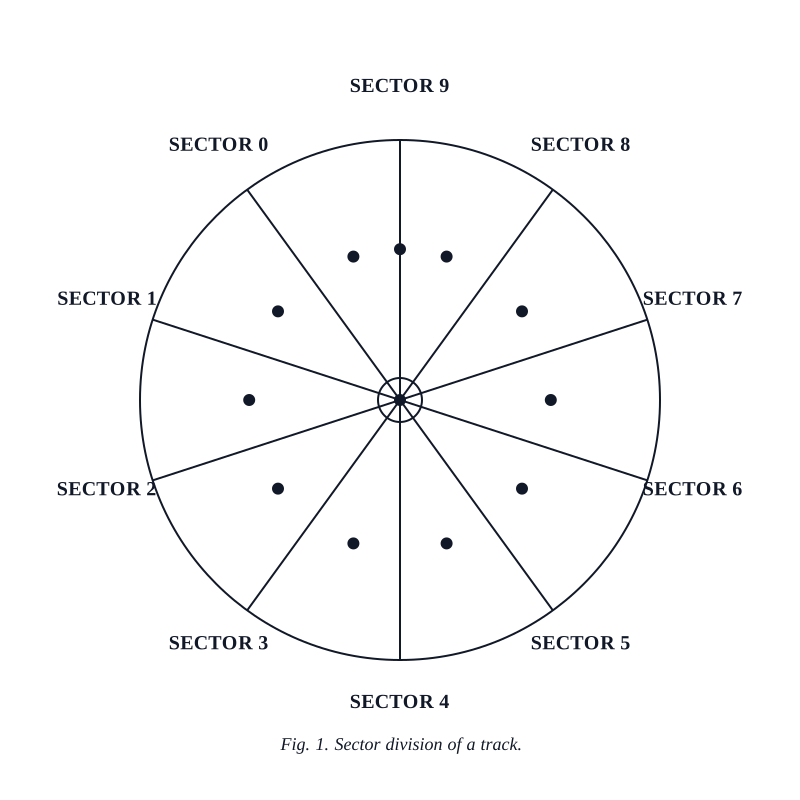

An LED and phototransistor within the floppy-disk drive uses these holes to produce sector pulses, which then can be monitored by the operating system to locate the start of a sector.
The HDOS Sector Header
HDOS could locate any sector on the diskette by first positioning the head on the correct track and then counting the number of sector pulses from the sector 0 mark generated by the drive. There is an inherent problem in such a scheme, however, in that the system could become lost by reading the wrong number of track or sector pulses.
Fortunately, HDOS does not subscribe to such a simple scheme.
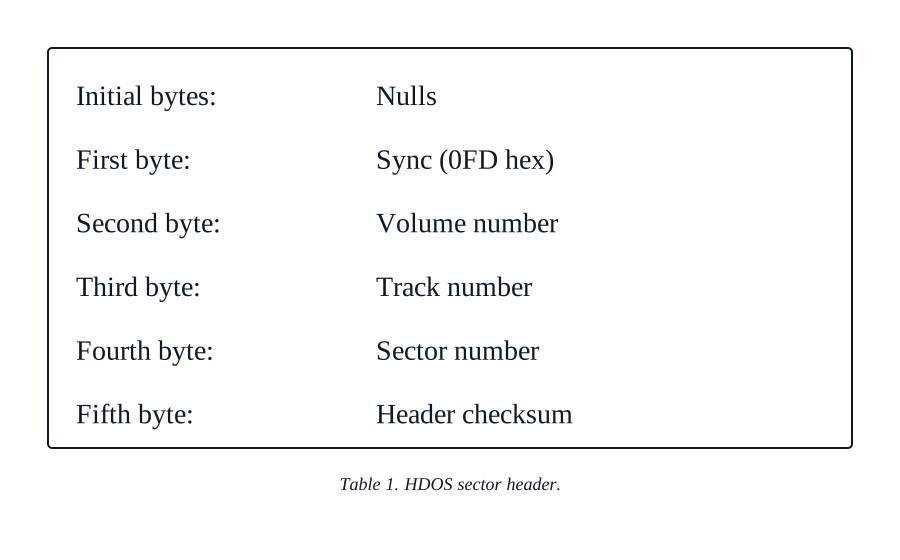
During the initialization process, HDOS writes a dummy sector within each physical sector. This dummy sector consists of two parts: sector header and data area.
The leading nulls in the header give the system some “slop” in head positioning since they will be ignored (as will anything before the sync byte). The sync byte (0FD hex) tells the floppy-disk controller electronics exactly when a sector header is under the drive head.
As you can see, the volume, track and sector bytes uniquely identify each sector on the diskette, and the header checksum identifies any errors that occur in reading this header.
If an incorrect volume byte or header checksum is read a number of times in succession, HDOS will call the sector bad. An incorrect track or sector byte will cause a new sector search to begin (with the associated nightmarish sounds from the drive stepper motor).
Using a sector header such as this, HDOS needs merely to read one sector to determine precisely where on a diskette the head is currently positioned. There is no chance of getting lost, as with the more primitive method. Additionally, we gain a speed increase in sector searches, since HDOS does not need to spend a lot of time just in locating the desired sector. The advantages far outweigh the small amount of overhead we pay in creating and detecting the sector headers.
Notice that each sector contains the volume number of the diskette. This is done so that no read or write operation will succeed to any diskette not correctly mounted by HDOS. Diskettes formatted on the Heath-Lifeboat CP/M system all normally have volume numbers of 0.
The Sector Data Area
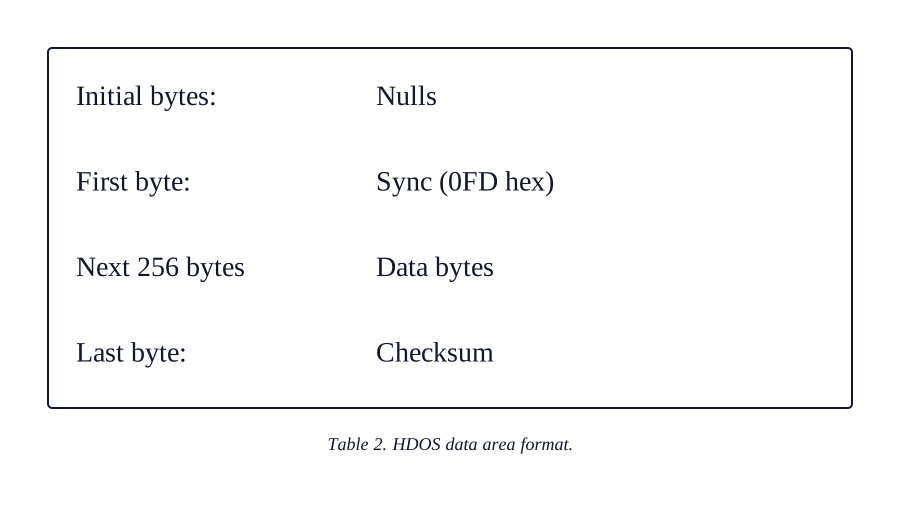
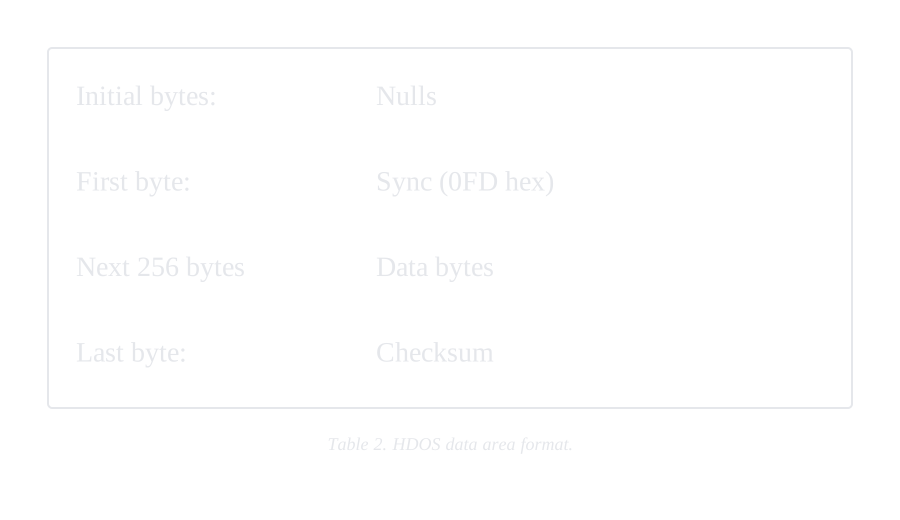
Immediately following the sector header and completely within the same physical sector is the data area.
Within the data area the nulls, sync bytes (also 0FD hex) and checksum perform the same basic functions as they do within the sector header.
The remainder of the data area consists of the actual 256 bytes in which we are really interested. During normal operations the sector formatting (header, sync bytes and checksums) is completely invisible to the operator.
Special Areas
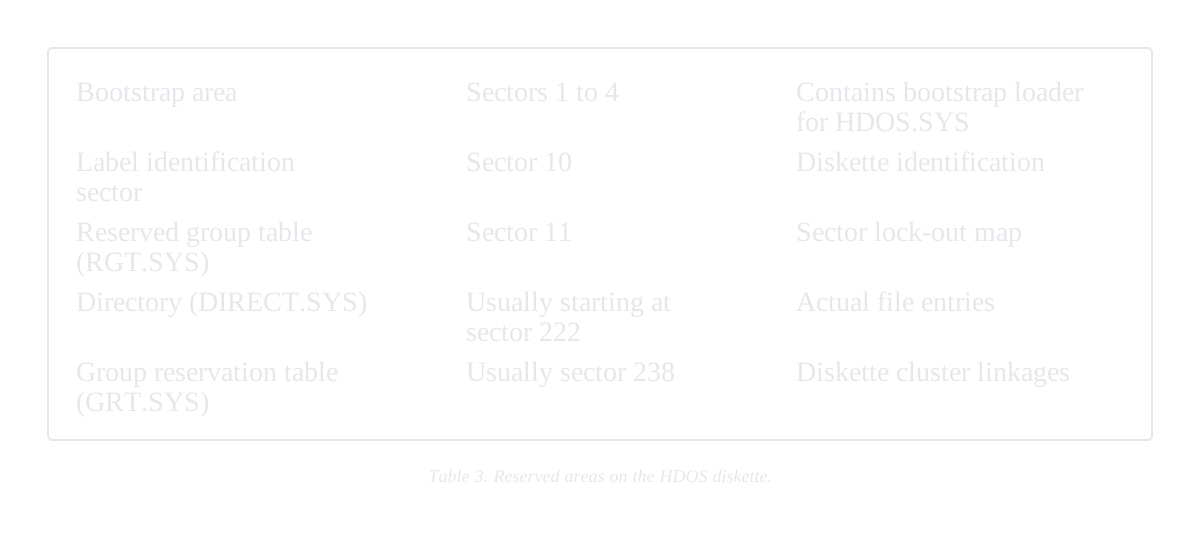
Once INIT has written dummy sectors throughout the entire diskette, it next creates five special areas necessary for the HDOS file-handling techniques.
Bootstrap area. The bootstrap area on the diskette contains the loader module for the operating system. When the HDOS system is cold-booted (i.e., brought up from scratch), the first four sectors (track 0, sectors 1 through 4) are loaded into memory and executed. These sectors provide the basic information necessary to locate—and load—the first part of HDOS (HDOS.SYS) into memory.
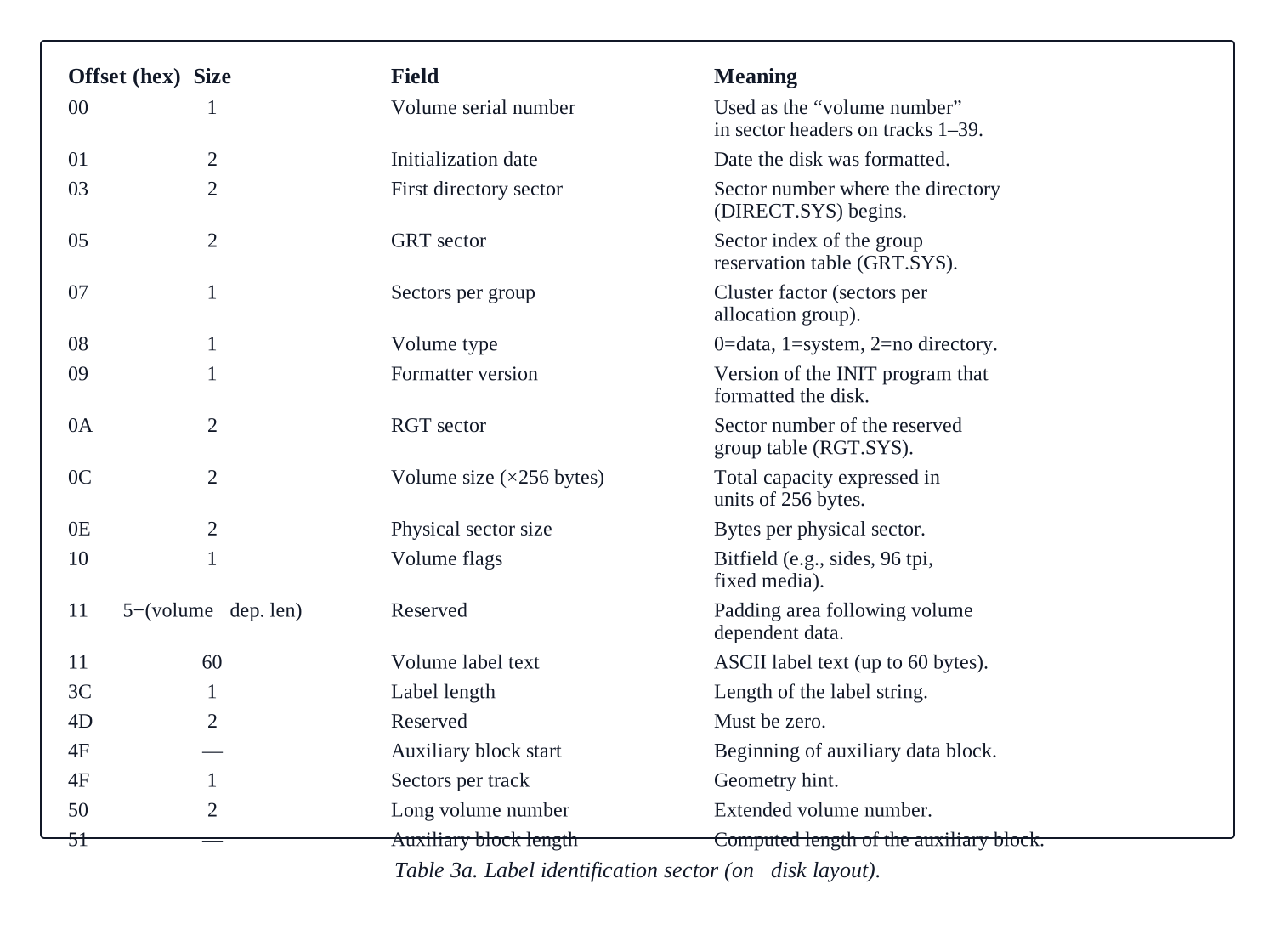
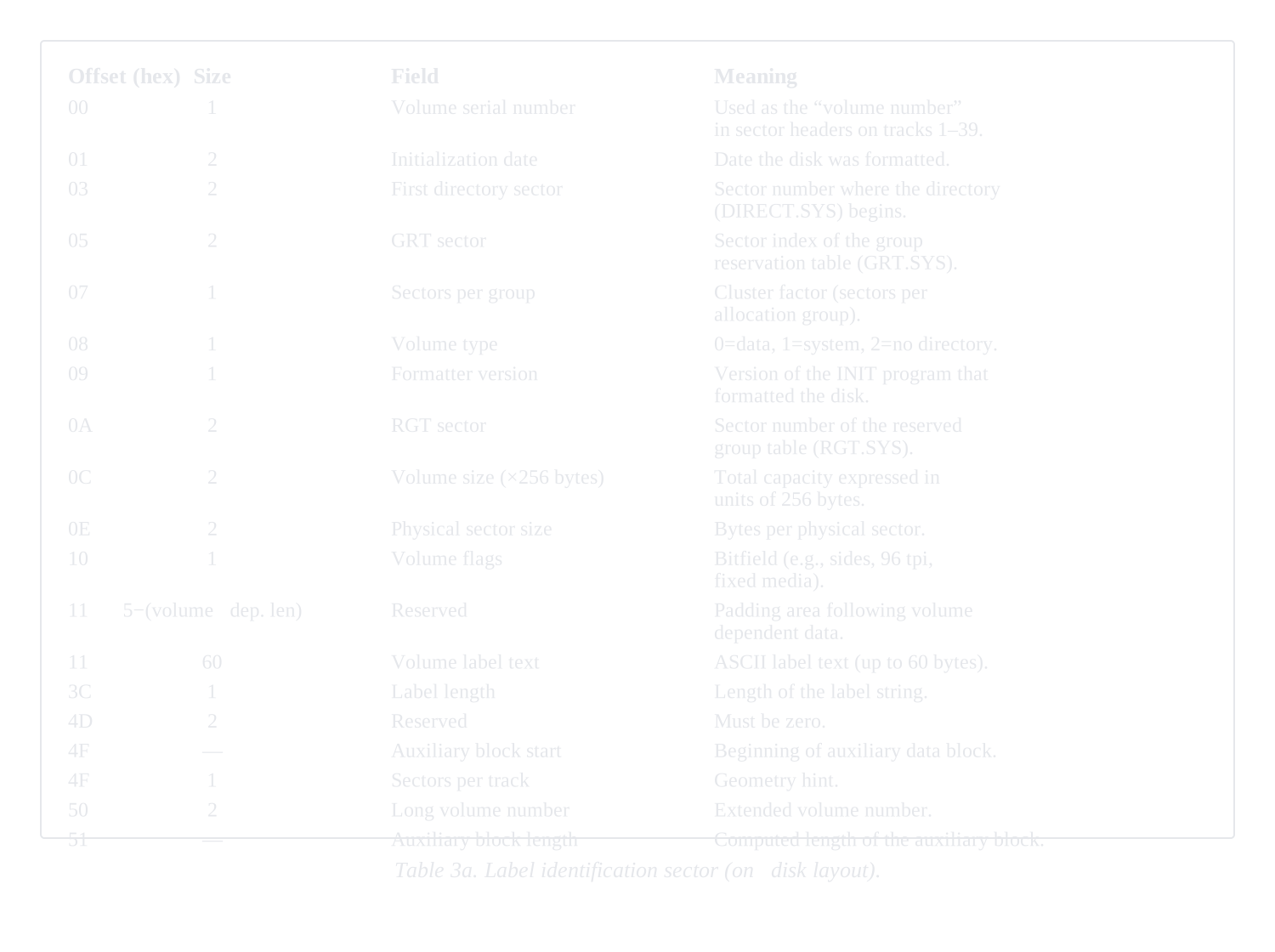
Label identification sector. The next reserved diskette area (track 0, sector 10) is used by HDOS to store some very basic facts about the diskette in question. Most importantly, this sector tells HDOS where to locate the start of the diskette directory and the GRT (group reservation table) sector. These two areas are the pointers to all the remaining files on the diskette.
HDOS has the ability to read files in small groups of sectors called clusters. Since these cluster sizes can apparently be varied from diskette to diskette, HDOS stores the current cluster size here also.
The remaining information within this sector is doubtless more familiar to you. This sector is also where the volume identification number and title are stored.
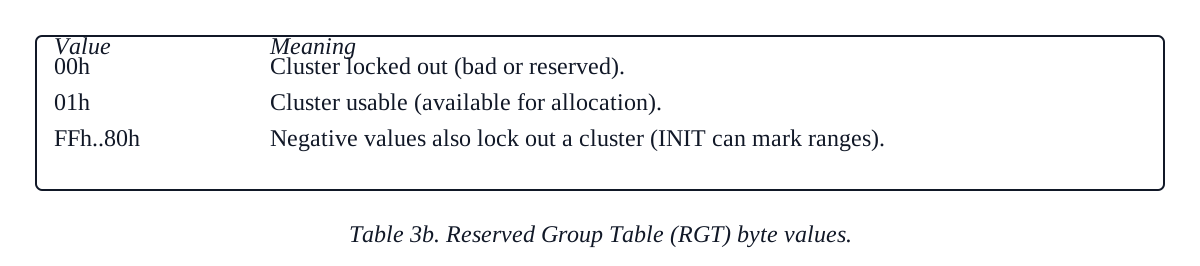
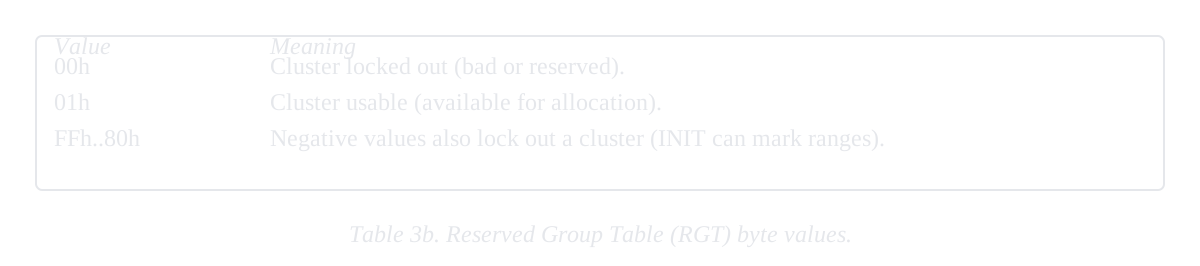
Reserved group table (RGT). The next sector we come upon (track 1, sector 1) contains the diskette RGT map. This sector allows HDOS to lock out bad clusters on the diskette with INIT.
Byte values within the RGT show the current status of the individual clusters in the same relative diskette positions. Usable clusters are marked with a 01 byte. Zero or any negative value locks sectors out.
When INIT formats a new diskette and prepares to write a blank directory, it first looks for a large enough number of good sectors in which to write it. Any bad sector returns will cause HDOS to lock out their clusters within the RGT. This is the only circumstance I know of that can cause a directory to be repositioned from its normal location (track 22, sector 2) on the diskette.
Track 0 is always locked out, since it is intended to be available for system use only.
Label Identification Sector: On-Disk Structure
This sector stores the directory start, the group-reservation table location, and the cluster factor as described above; it also carries the volume number and the human-readable volume title. The fields below are laid out as they appear on disk.
HDOS Directories
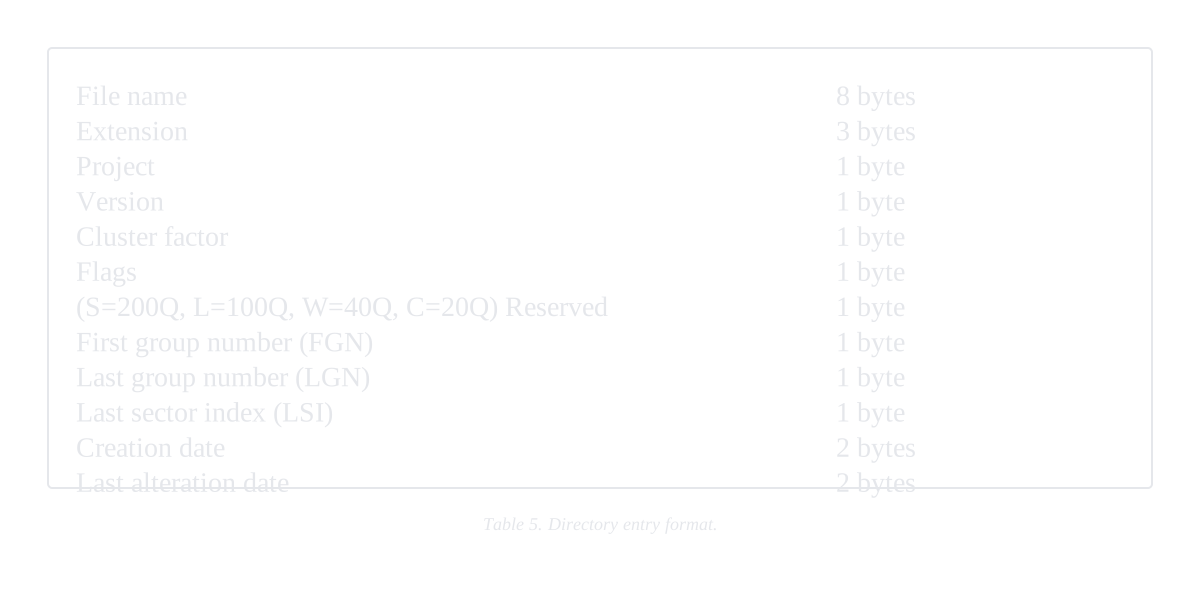
The directory ordinarily contains nine clusters of 22 entries each for a total of 198 possible entries.
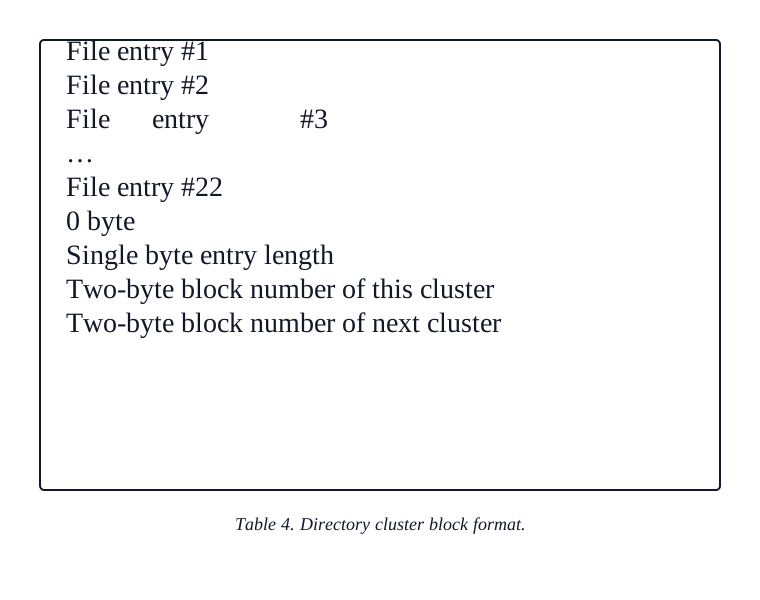
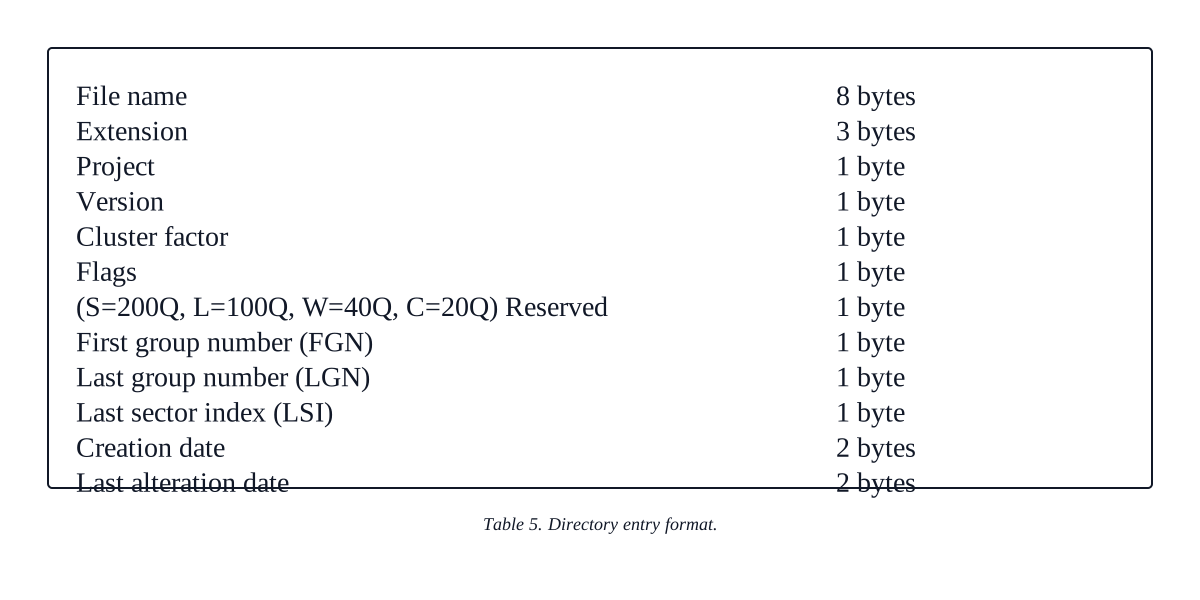
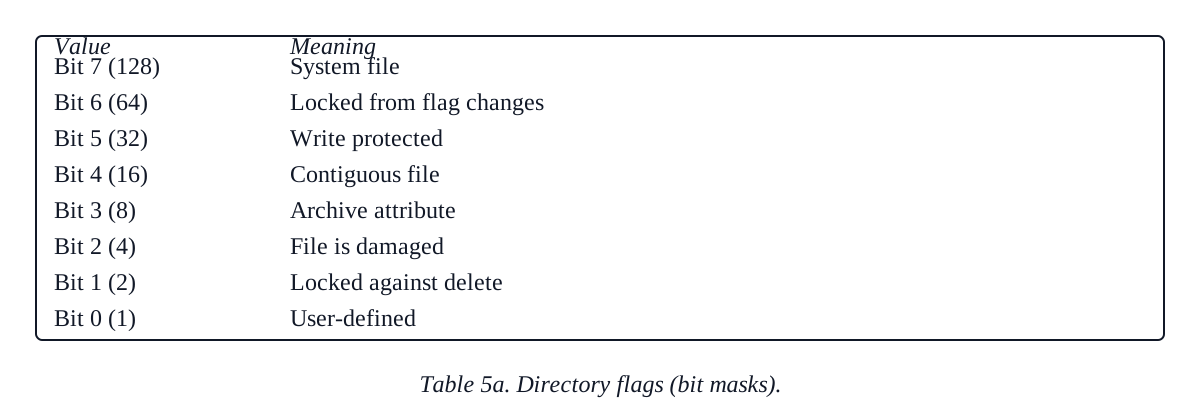
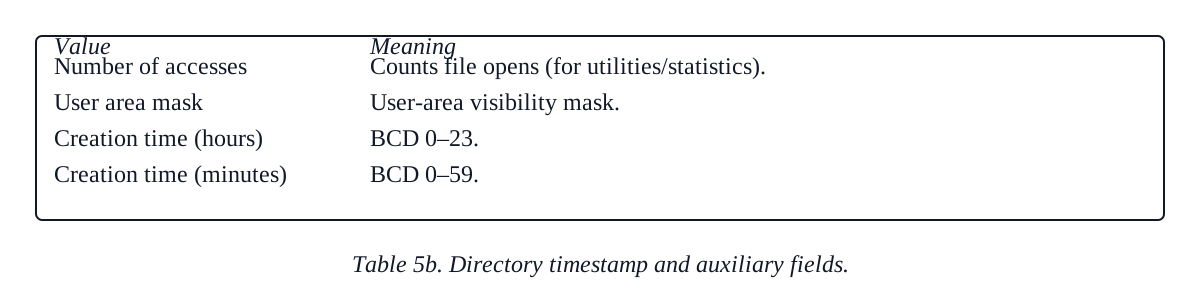
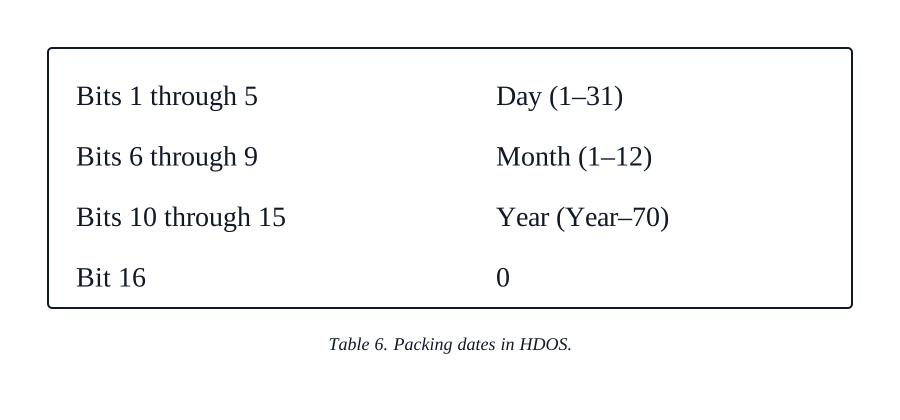
Each directory file entry consists of the same 23-byte format as shown.

Group Reservation Table (GRT)
HDOS locates file clusters on a diskette dynamically. If a file uses cluster 36, for example, the next cluster within the file is not necessarily cluster 37. It is possible to link any two clusters not otherwise in use together within a file.
This is done to make maximum usage of the empty disk area. Imagine that (as under older systems) an operating system were always to write a new file into the largest blank space available at the time. The system would work very well until it reached a point where it had a large file to write into a number of smaller empty spaces. The system could not then use the smaller spaces until they could be squeezed together into at least one space large enough to contain the current file.
This is the advantage of a dynamic file scheme. The system makes use of all the available blank space without concerning itself with whether or not it is in one large group or fragmented.
All over the disk, HDOS really gives the ability to do both (remember the C switch), although it normally uses the dynamic mode.
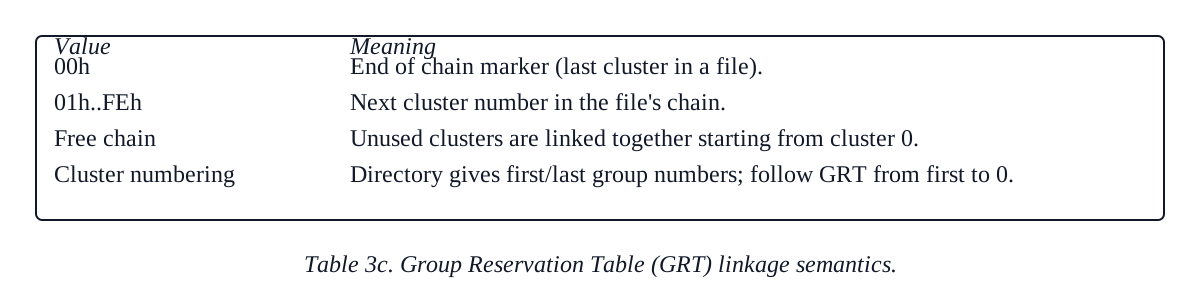
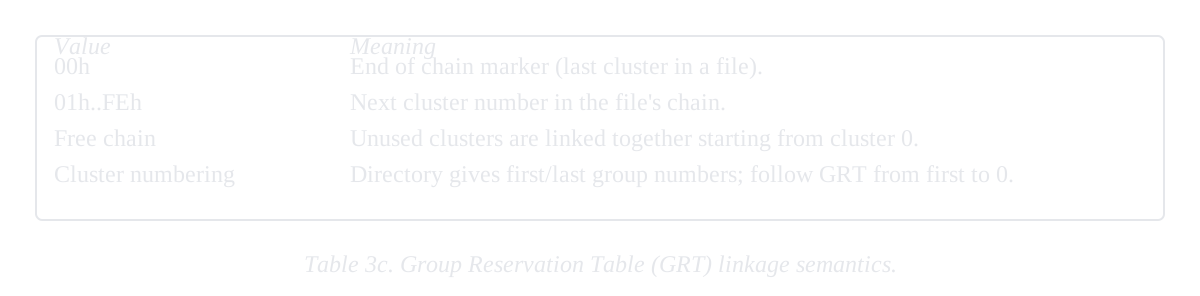
For this reason, the directory only points to the beginning and end of a file. The actual cluster linkage is stored within the GRT.
Groups of clusters are strung together within the GRT to form what HDOS calls chains. Even unused clusters are linked into a free chain.
When HDOS begins reading a file, it starts at the cluster specified by the directory entry. The next cluster read will be pointed to by the byte in the first cluster’s relative position within the GRT. This process continues until the entire file has been read. The byte in the last cluster’s position contains zero—which verifies that the file entry within the directory is correct, since the last group numbers should match.
In this manner, if the last cluster we read was 26, byte 26 in the GRT contains the next cluster number we should read (or 0 if we are finished).
The free chain is linked to cluster 0. This we can do since cluster 0 is part of the system area and is locked out by the RGT.
Corrupt Diskette Structures
One problem with such a complex dynamic file scheme is that it can lead to a rather spectacular diskette demise.
If the RGT, GRT or directory are overwritten, or written incorrectly, our file linkage chains may no longer match the directory entries or usable sector map.
Perhaps two directory entries reference the same diskette cluster or a file attempts to link to a lock-out sector. Such situations indicate corruption of the diskette file structure.
When HDOS tries to mount a diskette, these linkages are tested (and in some cases updated). If any contradictions are found you will get that wonderful “Disk Structure Is Corrupt” message and an instruction to contact the Heath technical assistance department. This is because Heath is trying to protect us from further damaging the file structure by preventing further diskette write operations.
A better way of handling this situation might have been to make the diskette mount as read-only. Currently the corrupted diskettes can only be read using absolute track and sector utilities (such as the ABSDUMP utility available from HUG).
Summary
HDOS is an amazingly sophisticated system as microcomputers go. A number of file-handling features are incorporated which are not available on many similarly priced systems.
It is appropriate indeed that Heath Company is beginning to free up a great deal of information to its users. Certainly this article would never have been possible had this not been the case. Heath has always been more responsive to its users than its competitors have been, and just recently this has also become true of its response to its computer hobbyist customers.
I am sure that, as more and more information such as this becomes apparent, we Heath users will see an explosion of very powerful utilities coming our way.
Perhaps the H8/H-89 will finally take its rightful place among the giants of the industry.