| GBU.IM / THE PERSONAL WEB | HTML 4.0 · RSS |
|
A WORKSHOP ON THE WORLD WIDE WEB Old machines. New possibilities. | UNLEASHED Hardware, software & a little curiosity. EST. 2025 |
| 01 HOME | 02 PROJECTS | 03 JOURNAL | 04 ABOUT |
THE DIRECTORY
Things I build.
Things I figure out.
Notes along the way.
ON THE WORKBENCH
Sisu
A second life for
the Nokia 3210.
SSE-9 / Hardware
DCP-3 / Firmware
FatFloppy
Old disks.
New conversations.
Tour & screenshots
Disks & formats
IN THE JOURNAL
Reverse engineering
Vintage computing
The complete archive
ELSEWHERE
YOU ARE HERE.
A personal corner of the web. Best explored one link at a time.
PROJECT 002 / FATFLOPPY
A tour of FatFloppy
| Overview | Visual tour | Getting started | Disks & formats | Real disks |
From a filename to the sectors behind it.
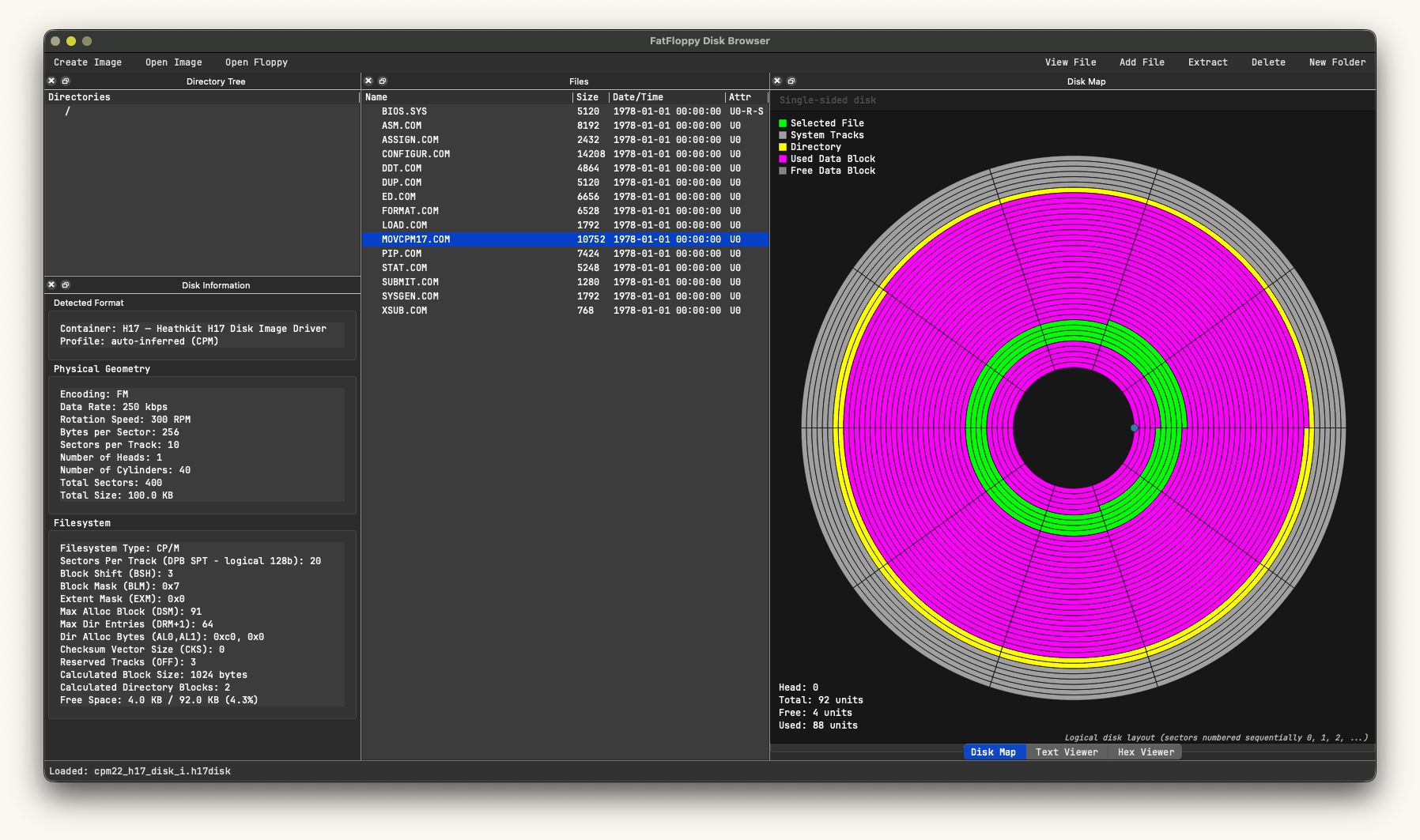
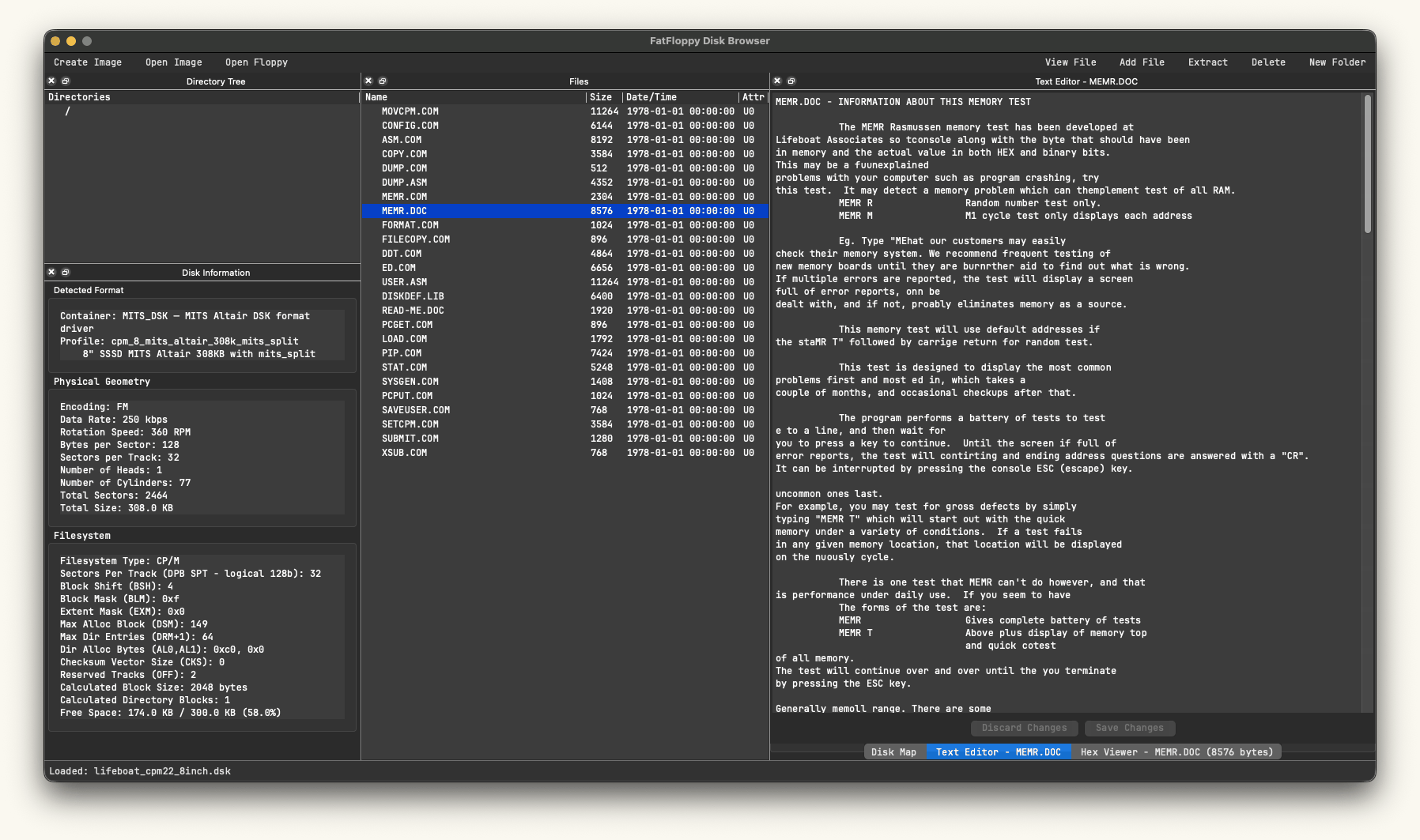
Here are two disks open in FatFloppy: a Heathkit H17 CP/M image and an 8-inch Lifeboat CP/M image for the MITS Altair. The windows are arranged with disk information on the left, files in the middle, and the map or viewer on the right.
On this page: The disk map / Disk information / Reading a file
01 Seeing a file on the disk
Open the full-size disk-map screenshot · GIF, 347 KB.
Selecting MOVCPM17.COM in the file list highlights its allocation on the map. In this example, the colours mean:
| Colour | What it shows | |
|---|---|---|
| Green | The selected file's allocation. | |
| Yellow | The directory area. | |
| Magenta | Used data blocks. | |
| Light grey | System tracks. | |
| Dark grey | Free data blocks. | |
The legend changes with the filesystem. Hover over a sector for its address and purpose; on a double-sided disk, use Switch Head to see the other side.
This is a logical map: sectors are drawn in order around the disk. The selected-file highlight can be approximate on interleaved or skewed layouts, including this H17 image and some RT-11 images.
02 Finding out what you opened
The Disk Information panel keeps three different things visible:
- Detected Format: the image container and the profile chosen or inferred from its contents.
- Physical Geometry: tracks, heads, sectors, sector size, and recording parameters.
- Filesystem: the file organisation, allocation details, and available space.
The H17 example has 40 cylinders, one head and ten 256-byte sectors per track: 100 KB of disk space. Its CP/M area reports 92 KB, with 4 KB free. The rest includes reserved system tracks and space outside full allocation blocks.
An H17 container can hold CP/M or HDOS. Likewise, an .img extension alone doesn't tell you which filesystem is inside. The format guide explains those combinations.
03 Reading an old document
Open the full-size file-viewer screenshot · GIF, 267 KB.
Here, MEMR.DOC is open from an 8-inch MITS Altair image. The document describes Lifeboat's memory test. The file list stays visible while the text opens beside it.
Double-click a file, or select it and choose View File. FatFloppy loads both text and hexadecimal views, bringing the likely match to the front. You can switch tabs if the guess is wrong.
The hex viewer shows offsets, byte values and printable characters. It is read-only. A file identified as text can be edited where the disk and filesystem allow writes; Save Changes writes the edit, and Discard Changes restores the loaded text. A binary file's text preview is read-only.
Extract saves the selected file to your computer. For Apollo backup files marked PARTIAL, use this command to follow the prompts for the next disk image; dragging a file out only retrieves the available portion.
Source on GitHub / Questions & bug reports / All projects
FatFloppy by Igor Biletski. Software released under the Unlicense. Vintage software and documents shown in the screenshots retain their original credits.
| GEARS & BYTES / Igor Biletski Made for curious people and the computers they keep. | About this site · Back to top ↑ © 2026 · No JavaScript required. |