| GBU.IM / THE PERSONAL WEB | HTML 4.0 · RSS |
|
A WORKSHOP ON THE WORLD WIDE WEB Old machines. New possibilities. | UNLEASHED Hardware, software & a little curiosity. EST. 2025 |
| 01 HOME | 02 PROJECTS | 03 JOURNAL | 04 ABOUT |
THE DIRECTORY
Things I build.
Things I figure out.
Notes along the way.
ON THE WORKBENCH
Sisu
A second life for
the Nokia 3210.
SSE-9 / Hardware
DCP-3 / Firmware
FatFloppy
Old disks.
New conversations.
Tour & screenshots
Disks & formats
IN THE JOURNAL
Reverse engineering
Vintage computing
The complete archive
ELSEWHERE
YOU ARE HERE.
A personal corner of the web. Best explored one link at a time.
PROJECT 002 / FATFLOPPY
FatFloppy
| Overview | Visual tour | Getting started | Disks & formats | Real disks |
There are still files on those floppies.
FatFloppy brings a familiar file browser to vintage disks. Open an image, read an old document, pull out a file, or see how the disk is laid out. With a Greaseweazle and a supported drive, you can work with real floppies too.
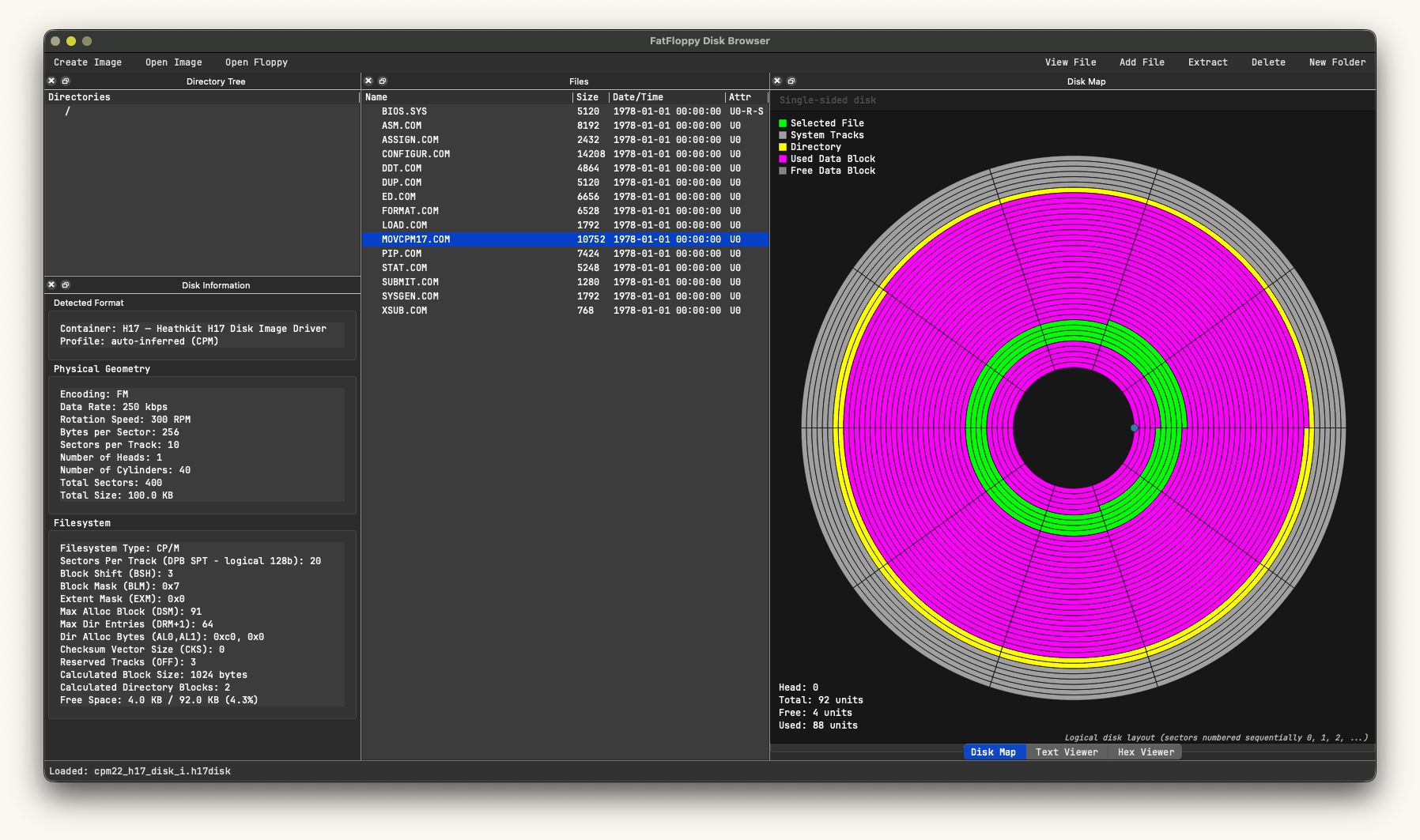
A Heathkit H17 CP/M image, with MOVCPM17.COM selected. View full-size screenshot · GIF, 347 KB.
Get FatFloppy 0.2.0 » / Take the visual tour
For Windows, macOS and Linux. Version 0.2.0 was released on 13 September 2026. FatFloppy is still alpha software; use copies of disk images when trying edits.
A file browser, with the disk underneath.
The directory tree and file list are the starting point. Beside them, a disk information panel identifies the container, geometry and filesystem. The map shows system areas, directories, used space and free space, with a highlight for the selected file.
Open a file to switch between text and hexadecimal views. Extract it to your computer, or add files and edit text on supported writable media. You can also create and format a new blank image for a supported machine.
More than DOS disks
FAT12, CP/M, HDOS, Commodore CBM DOS and DEC RT-11 all have read/write support in suitable image containers. Apollo DOMAIN backup sets and native SR9 AEGIS volumes can be browsed and extracted read-only.
FatFloppy examines the disk contents to identify the format, including many images without a standard boot-sector description. The container and filesystem both matter: a writable filesystem inside a Teledisk archive still opens read-only.
Find your disk in the format guide »
Find your way in
| Start here | What you'll find |
|---|---|
| Visual tour | The disk map, file browser, and text and hex viewers, with two real examples. |
| Getting started | Choose a download, open your first image, and extract a file. |
| Disks & formats | Supported systems, image containers, and the limits that matter. |
| Working with real disks | Greaseweazle, drive selection, reading a floppy, and saving a sector image. |
From the workbench
Some of the most interesting disks don't fit the usual assumptions: CP/M images without a known disk parameter block, DEC images stored in different sector orders, or Apollo backups split across several floppies. Those are the kinds of details I like working out.
For a closer look at one of these systems, read Dissecting the HDOS Diskette in the journal.
Source on GitHub / Questions & bug reports / All projects
FatFloppy by Igor Biletski. Software released under the Unlicense. Vintage software and documents shown in the screenshots retain their original credits.
| GEARS & BYTES / Igor Biletski Made for curious people and the computers they keep. | About this site · Back to top ↑ © 2026 · No JavaScript required. |